Maintenance job settings
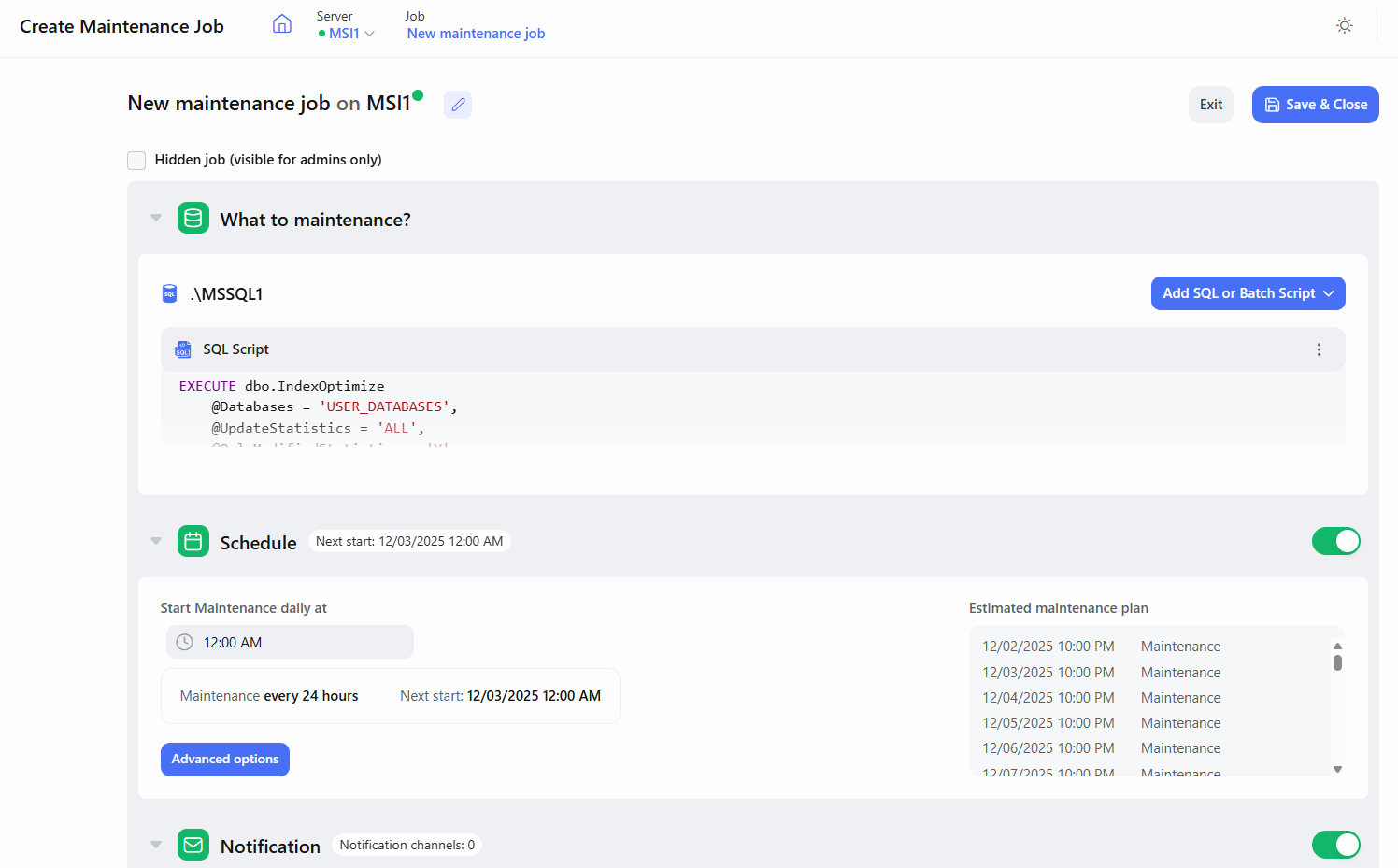
In a maintenance job, you can specify the following:
1) SQL or Shell scripts (for Windows – CMD, for Linux – Bash)
In a maintenance job, you can add one or more scripts to execute. Two types of scripts are supported:
- SQL scripts – executed directly in the database. These scripts are similar to those specified in backup jobs. For more details about SQL scripts, see the corresponding section on SQL scripts in backup jobs.
- Shell scripts (CMD for Windows, Bash for Linux) – executed as system commands on the server. These scripts are similar to those specified in backup jobs. For more details about CMD scripts, see the corresponding section on CMD scripts in backup jobs.
2) Schedule
In the schedule section, you can configure when and how often the maintenance job should run. Scheduler settings are similar to scheduler settings in backup jobs. For more information, see the scheduler settings in backup jobs.
3) Notifications
In a maintenance job, you can specify one or more notification channels to which the script execution results will be sent. Notification settings are similar to notification settings in backup jobs. For more information, see the notification settings in backup jobs.
4) Maintenance job options (Job Options)
In the maintenance job options, you can specify the following settings:
- Default folder – path to the folder for script execution. This setting only makes sense for shell scripts
Examples of using maintenance jobs
Below are practical examples of using maintenance jobs for various databases and operating systems.
SQL Server
Updating statistics
Regular statistics updates help the query optimizer choose optimal execution plans. It is recommended to run weekly:
EXEC sp_updatestats;
Rebuilding indexes using Ola Hallengren script
For comprehensive index maintenance, you can use the popular Ola Hallengren script. Add the script to a maintenance job and configure the schedule:
EXECUTE dbo.IndexOptimize
    @Databases = 'USER_DATABASES',
    @UpdateStatistics = 'ALL',
    @OnlyModifiedStatistics = 'Y'
MySQL
Analyzing tables
The ANALYZE TABLE command updates table statistics, which helps the query optimizer make more accurate decisions:
ANALYZE TABLE table_name;
Optimizing tables
Optimizing tables дефрагментирует данные и перестраивает индексы. Рекомендуется выполнять раз в месяц для таблиц с частыми операциями UPDATE и DELETE:
OPTIMIZE TABLE table_name;
PostgreSQL
Reindexing
The REINDEX command rebuilds indexes, eliminating fragmentation and freeing unused space:
REINDEX DATABASE database_name;
Cleaning up log tables
Regular cleanup of log tables helps control database size. Example for log tables older than 30 days:
DELETE FROM log_table WHERE created_at < NOW() - INTERVAL '30 days';
BAT (Windows)
Cleaning temporary directories
The script cleans temporary files in the specified directories, freeing up disk space:
@echo off
for /d %%i in ("%TEMP%\*.*") do rd /s /q "%%i" 2>nul
for %%i in ("%TEMP%\*.*") do del /q "%%i" 2>nul
Checking disk for errors
The CHKDSK command checks the disk for file system errors. In read-only mode, it does not require a reboot:
chkdsk C: /f /r
BASH (Linux)
Cleaning temporary directory
The script safely cleans temporary files older than 7 days:
#!/bin/bash
find /tmp -type f -atime +7 -delete
Checking disk for errors
The script checks the disk for bad blocks and exits with an error if problems are found:
sudo badblocks -v /dev/vda4 > /tmp/badblocks.log 2>&1
grep -q "0/0/0 errors" /tmp/badblocks.log || exit 1