SQL Scripts
SQL Scripts
The SQL scripts specified in the backup job settings are executed on the DBMS (Database Management System) defined in the connection settings of that particular backup job.

Example use case
With SQL Server, you can run:
DBCC CHECKDB
before the backup, to check the database for corruption and avoid carrying forward underlying issues.
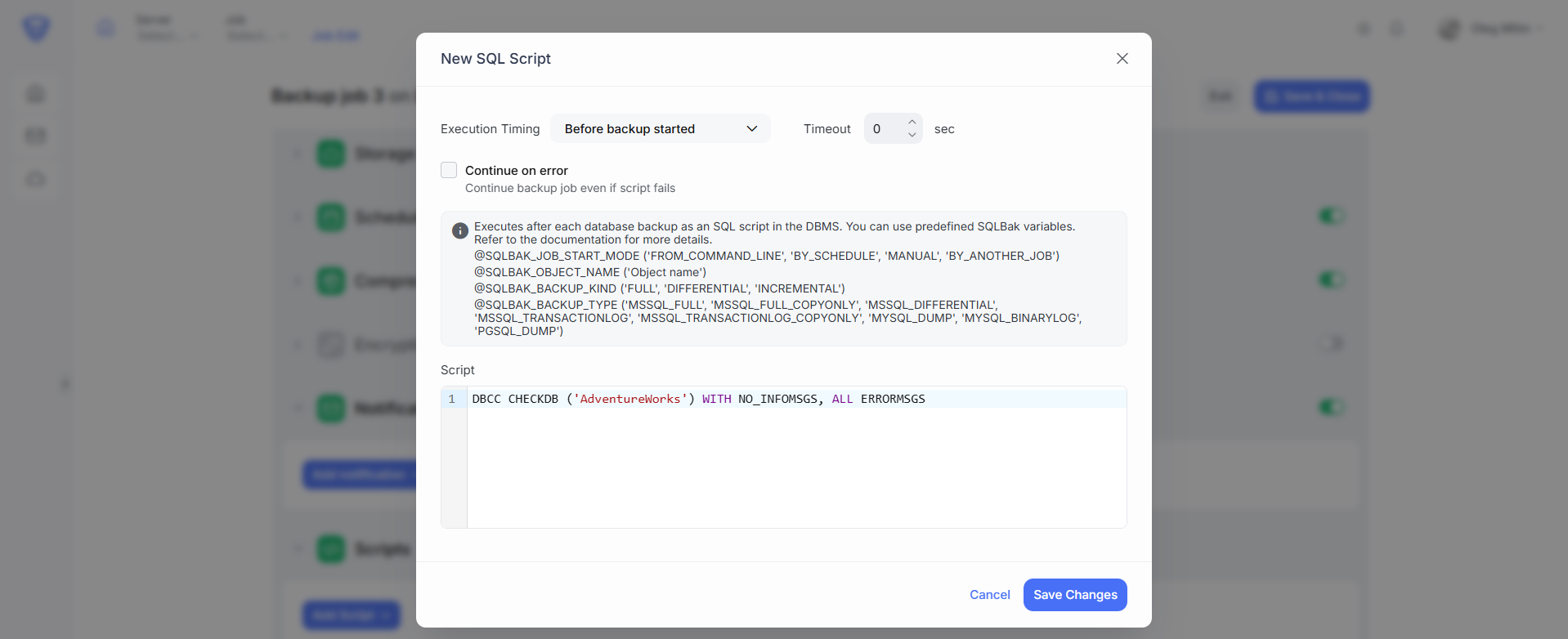
SQL script settings:
When adding a SQL script to the job, you can control when it runs by selecting one of these options:
| Execution Timing | Description |
|---|---|
| After job started | Runs right after the backup job begins, before any backup operations. |
| Before job finished | Runs after all backups complete, but before the job is officially marked as finished. |
| Before backup started | Runs before the backup of each individual database begins. |
| After backup finished | Runs after each individual database backup completes (commonly used for post-tasks). |
| After uploads finished | Runs after all backup files have been uploaded to the storage destination. |
Continue on error – If this is checked, the backup job will continue as if it succeeded, even if the script fails.
Timeout – Sets the maximum allowed execution time for the script (in seconds). If the script exceeds this time, it will be forcibly terminated. This helps prevent long-running or stuck scripts from delaying the backup process.
Script field – provide the script command you want to run.
Available predefined variables
You can use these variables inside your SQL scripts:
| Variable | Description |
|---|---|
@SQL_BACKUP_TYPE |
Backup type code, e.g., FULL, DIFF (for Differential), INCREMENTAL. |
@SQLBAK_JOB_SUCCESS |
Flag: 1 (success), 0 (failure). Only available at the end of the job. |
In addition, there are other script context variables:
| Variable | Example values |
|---|---|
@SQLBAK_JOB_START_MODE |
FROM_COMMAND_LINE, BY_SCHEDULE, MANUAL, BY_ANOTHER_JOB |
@SQLBAK_OBJECT_NAME |
Name of the object being backed up. |
@SQLBAK_BACKUP_KIND |
FULL, DIFFERENTIAL, INCREMENTAL. |
@SQLBAK_BACKUP_TYPE |
MSSQL_FULL, MYSQL_DUMP, PGSQL_DUMP, etc. |
@SQLBAK_BACKUP_SUCCESS |
1 (success), 0 (failure). |
@SQLBAK_UPLOAD_SUCCESS |
1 (upload succeeded), 0 (upload failed). |