Scheduler
Scheduling backups in SqlBak
One of the key features of SqlBak is the ability to run backups on a schedule. In the sqlbak.com interface, you can configure an automatic launch of a backup job. The selected settings will be passed to the backup agent, which will execute the backup job regardless of whether there is an Internet connection to sqlbak.com or not.
The type of backup that is executed (Full, Differential, Incremental \ Transaction Log) is also defined in the scheduler.
A typical schedule is a daily run of Full backups, which can be set directly from the backup job.
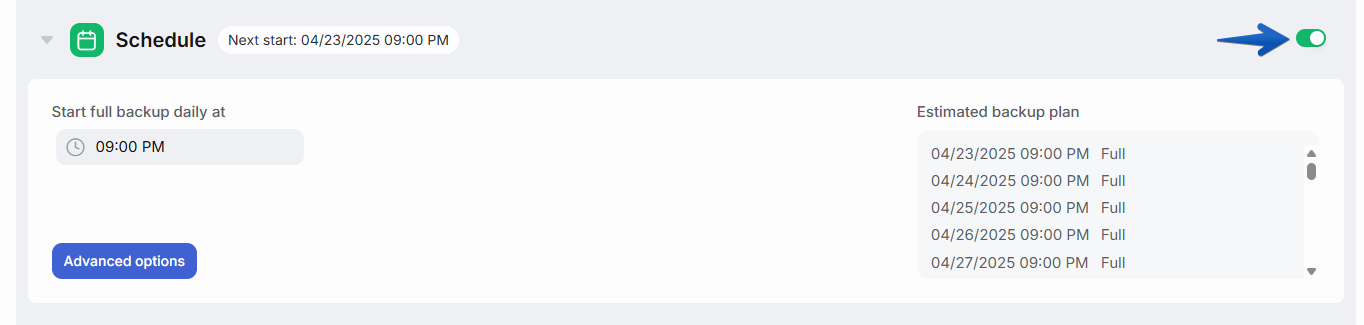
If you want to define more complex scheduling rules, click the Advanced Options button.
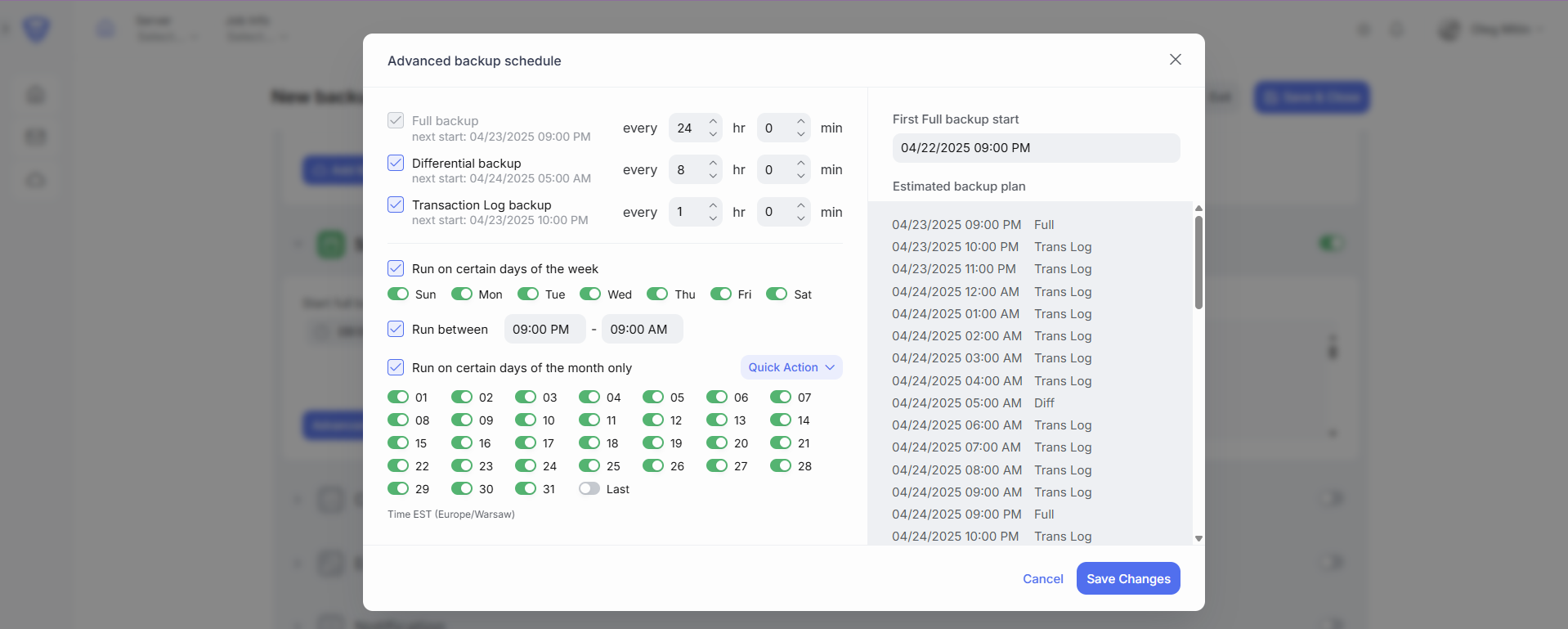
In the Advanced Scheduler settings, you can specify which types of backups to perform, how frequently, and also exclude certain daily intervals, specific days of the week, or particular calendar days.
Important notes when configuring the schedule:
- Backup dates are calculated by adding the specified intervals starting from the value of the First Full Backup Start field.
- If two backups are scheduled at the same time (for example, every 6 hours a Full backup and every hour a Differential, then once every 6 hours the times will overlap): the backup type will be chosen based on the following priority: Full → Differential → Transaction Log / Incremental.
- If you use options that restrict daily, weekly, or monthly execution intervals, make sure that the value of the First Full Backup falls within the allowed interval.
- The schedule must be set according to the time zone specified in the scheduler window.
Recommendations and Sample Backup Plans
When creating a backup schedule, you should rely on your business requirements, focusing on target RTO (Recovery Time Objective) and RPO (Recovery Point Objective), available storage volume, server workload, etc.
There is no universal algorithm that will cover every case.
Below are sample backup plans that should be considered as starting points for planning rather than direct recommendations.
SQL Server
For SQL Server databases, we recommend using a backup plan that contains Full + Differential backups, or Full + Differential + Transaction Log backups.
During the restore process, SqlBak will download and restore all the necessary backups in the required sequence.
Set the First Full backup start option to nighttime (for example, 3:00 am).
This ensures that Full backups are always performed at night.
If Full backups should be run with a frequency of 168 hours (once a week), then set the First Full backup start option to the nighttime of a weekday or weekend, depending on the database usage.
Consider the following backup plans:
Full + Differential
- Full – every 24 hours
- Differential – every 3 hours
- Full – every 168 hours
- Differential – every 6 hours
Full + Differential + Transaction Log
- Full – every 24 hours
- Differential – every 3 hours
- Transaction Log – every 15 minutes
- Full – every 24 hours
- Differential – every 6 hours
- Transaction Log – every 1 hour
- Full – every 168 hours
- Differential – every 24 hours
- Transaction Log – every 3 hours
MySQL Server
MySQL Server uses binary log files, which sequentially record all transactions that change data in the database.
These files can be backed up and used for data restoration.
In SqlBak, a backup of binary log files is called an incremental backup.
However, MySQL Server incremental backups have one drawback – slow restore speed.
Therefore, it may not be a good idea to perform them too frequently.
We recommend using MySQL Server incremental backups with the following frequency:
Full + Incremental
- Full – every 6 hours
- Incremental – every hour
- Full – every 24 hours
- Incremental – every 3 hours
- Full – every 168 hours
- Incremental – every 12 hours (or 24 hours)