SQL Server
How does SqlBak backup SQL Server database?
SqlBak performs backups using T-SQL command BACKUP DATABASE, ensuring optimal speed and reliability.
Full backups are created with the following command:
BACKUP DATABASE [db_name] TO DISK = "path\to\backup\file.bak"
Differential backups are created with the following command:
BACKUP DATABASE [db_name] TO DISK = "path\to\backup\file.bak" with differential
Transaction log backups are created using the following command:
BACKUP LOG [db_name] TO DISK = "path\to\backup\file.bak"
Restore a backup SQL Server databases
The restore process is performed using the command RESTORE DATABASE:
RESTORE DATABASE [db_name] FROM DISK = "path\to\backup\file.bak"
To view the full command used by SqlBak, enable Debug log mode in the Job Log:
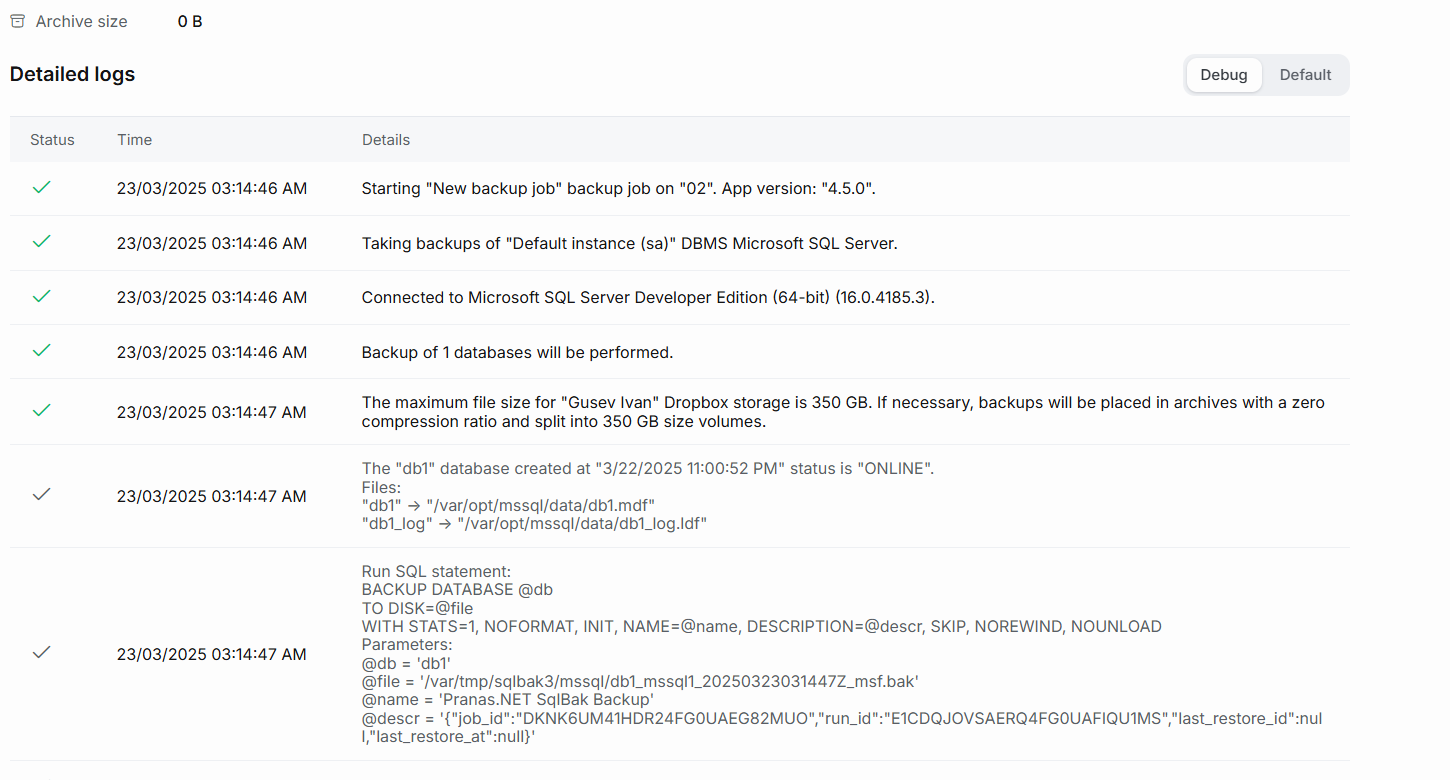
Features of backups created by SqlBak
-
Hot backup – This means that no need to stop SQL Serever to create a backup. During the backup process, your database is available for connections and can execute both read and write queries.
-
Consistent backup – At the moment the backup creation starts, the state of the database for the session that is creating the backup is “frozen.” This means that if other users or threads are writing data to the database, those changes will not be included in the backup. The backup will reflect the exact state of the database at the moment the backup creation begins.
-
Physical backup – A backup is created by copying binary data directly from the database files into the backup file. Such backups and restores are performed quite quickly and almost do not load the CPU (unless compression is enabled).
-
No backward compatibility – A backup can be restored to a later version of SQL Server, but not to an earlier version.
-
Differential backups contain only the changes that have occurred since the last full backup.
-
Transaction log backups contain the changes that have occurred since the last full backup or transaction log backup.