MySQL
How does SqlBak backup MySQL databases?
SqlBak creates logical backups for MySQL using the mysqldump utility:
mysqldump is a program developed by MySQL Server developers specifically for MySQL backups. A backup created with this utility is transactionally consistent and does not stop the database. Here is an example of a backup command executed by SqlBak:
mysqldump --user "user" --password="*********"--databases "db_name" --result-file="c:\path\to\backup\file.sql"
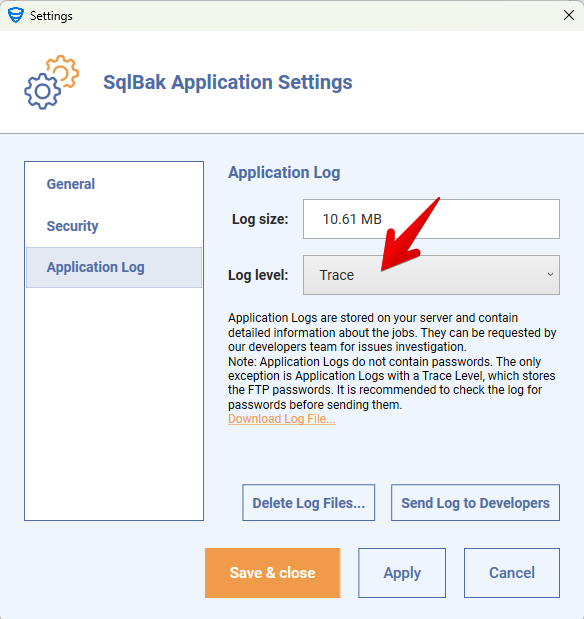
To see the full command used by SqlBak, enable Trace logs in the Job Log:
Restore a backup MySQL databases
To restore the backup, SqlBak uses the mysql utility:
mysql --user "user" --password="*********" < c:\path\to\backup\file.sql
SqlBak may use additional parameters for the mysql command.
Specifying the path to backup and restore utilities
Windows
Both mysql.exe and mysqldump.exe are installed along with the application files in the directory: C:\Program Files (x86)\Pranas.NET\SqlBak\DBMS\MySQL
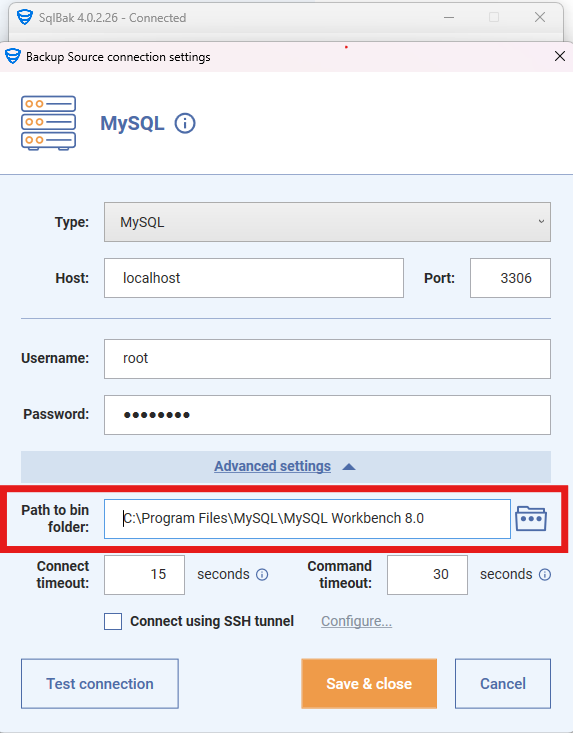
If you encounter version compatibility issues, you can manually specify the path to the required utilities in the Advanced Connection Settings To do this, set the path to the MySQL Workbench utilities, for example: C:\Program Files\MySQL\MySQL Workbench 8.0
Linux
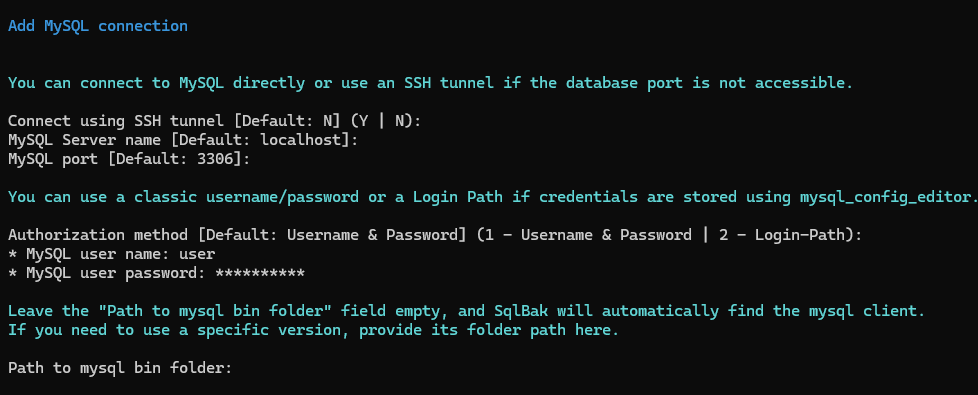
If MySQL Server or MySQL Client is installed on the server, SqlBak will automatically find the backup utilities. However, if you need specific versions of the utilities, you can specify them when adding a database connection:
Features of backups created by SqlBak
- Hot Backup – the database remains available during backup. SqlBak does not stop the MySQL server, and your database can continue processing read and write requests.
- Consistent Backup – At the moment the backup starts, the database state is “frozen” for the backup session. If other users or processes write data to the database during the backup, those changes will not be included. The backup will reflect the exact database state at the time the backup started.
- Logical Backup – SqlBak creates a text-based backup file that contains SQL statements such as
CREATE DATABASE,CREATE TABLE, andINSERT INTO. To restore the database, simply execute this file. If necessary, you can edit the backup file using a text editor. Logical backups are generally compatible across different MySQL versions, making it easy to restore databases on newer MySQL versions without issues.
Incremental backup
SqlBak supports incremental backups for MySQL by utilizing binary logs (binlog). To enable incremental backups, binary logging must be enabled in the MySQL configuration (set log_bin in my.cnf).
How to Enable Binary Logging on Windows
How to Enable Binary Log in Linux
How SqlBak backs up binary logs?
- Runs
FLUSH BINARY LOGS;– This creates a new binlog file. - Identifies the latest binlog file – This marks the start of the next incremental backup.
- Reads the available binlog files from the
binlog.indexfile. - Copies all binlog files that appeared since the last incremental backup to an archive.
We recommend creating a single backup job for all databases because all transactions for all databases are stored in a single binlog file. Running multiple incremental backup jobs in parallel can cause data duplication and significantly increase storage usage in the backup destination.
When does SqlBak perform a full backup instead of an incremental one?
SqlBak automatically triggers a full backup instead of an incremental backup in the following cases:
-
After adding Incremental backups to a backup plan
To restore data from incremental backups, an initial full backup with special options is required. By default, SqlBak does not use these options, so the first backup after enabling incremental backups is always full.
-
When the database schema has changed
Changes such as adding, deleting, or modifying tables and columns are recorded in binlog files. These transactions are stored at the DBMS level and cannot be properly restored under a different name. To detect changes in the database schema, SqlBak performs a data schema backup and calculates its checksum. If the checksum changes, a full backup is triggered.
-
If a previous backup job failed
A failed backup job breaks the incremental backup chain, making existing binlog files unreliable. To maintain data integrity, SqlBak automatically performs a full backup after a failed incremental backup attempt.