How to Enable Advanced Log
How to Enable Advanced Log
When you face any issues with SqlBak, our support team may ask you to send the Advanced Log.
Below is a step-by-step guide on how to do this.
About logging levels. SqlBak supports the following log levels. Note that each subsequent level includes the previous one:
- None – logging is disabled
- Critical – only errors that could not be caught inside the application are logged
- Error – only errors are logged
- Warning – warnings that indicate a potential issue but are not necessarily critical are logged
- Information – main application actions are logged
- Debug – detailed debug information. This is the level usually requested by support.
Note: this level may consume noticeable disk space. - Trace – maximum detailed logs. In rare cases, this level may include sensitive data (e.g., database credentials).
Before sharing such logs with third parties (or sending to SqlBak support), please manually remove sensitive information.
Also note: this level can take up a lot of disk space and should only be enabled for troubleshooting purposes.
For Windows
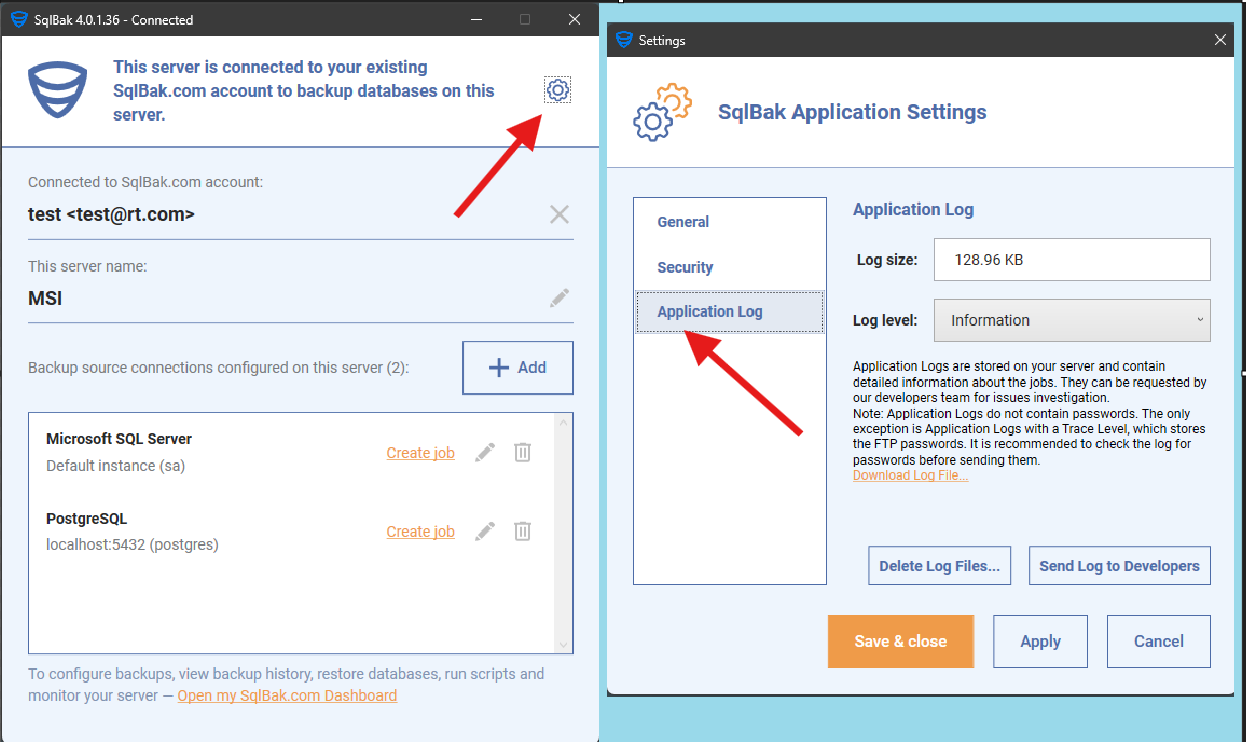
- Open the SqlBak Configuration App.
- Click the gear button in the upper-right corner.
- In the opened Settings window, go to the Advanced Log tab.
- Select the desired log level.
- Reproduce the issue or wait until it happens again (so the needed information is recorded in the log).
- Once the issue occurs, open the Settings window again.
- Click Send Log to Developers.
- Notify the support team that you have sent the Advanced Log.
For Linux:
- Save the current log settings to a file using:
sqlbak log-settings --save-to-file=/path/to/log-settings.json
The settings file will look like this:
{ "log_level": "Information" } - Edit the file and set the desired
log_level. - After editing the file, apply the changes using:
sqlbak log-settings --load-from-file=/path/to/log-settings.json
- Once the problem is reproduced, send the logs to developers using:
sqlbak app-log --send-log-to-dev