Script Execution Restrictions
Script Execution Restrictions
Understanding Script Restrictions
Script execution restrictions control whether scripts configured in SqlBak jobs are allowed to run on the agent machine. These settings apply to all backup, maintenance, and restore jobs executed by the agent.
SqlBak has two script execution permissions:
- System scripts – Command-line scripts such as Windows batch files,
.cmdfiles, PowerShell scripts, or Linux shell scripts. - Source scripts – SQL scripts executed against a configured database source.
By default, script execution should remain disabled unless the server administrator explicitly allows it.
Configuring Script Restrictions via Windows UI
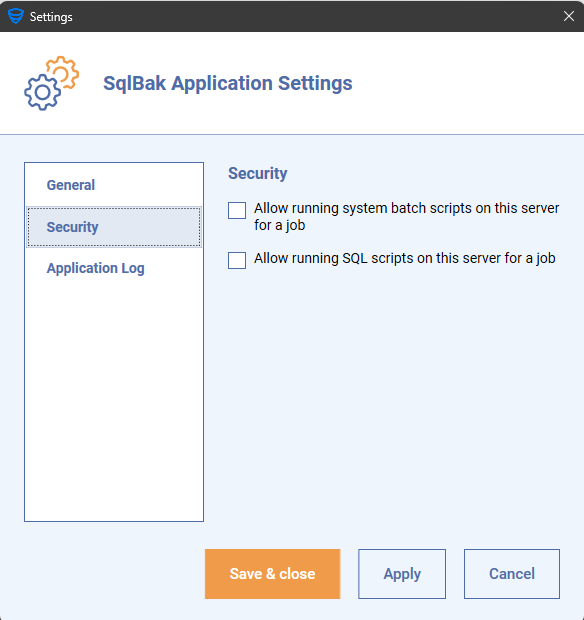
On Windows, use the SqlBak Agent Config App and open the Script Execution Restrictions section.
Use these checkboxes:
- Allow running system batch scripts on this server for a job
- Allow running SQL scripts on this server for a job
Changes apply to subsequent job runs on this agent.
Configuring Script Restrictions via Command Line
On Linux, Docker, or when automating agent configuration, use the security-settings command.
To export the current settings to a JSON file:
sqlbak security-settings get --save-to-file=/tmp/security-settings.json --confirm
Edit the JSON file:
{
  "allow_exec_system_scripts": true,
  "allow_exec_source_scripts": true
}
Then load the settings:
sqlbak security-settings set --load-from-file=/tmp/security-settings.json
To reset the application security settings to defaults:
sqlbak security-settings reset --confirm
JSON settings
allow_exec_system_scripts
Allows system scripts to run from SqlBak jobs. Set it to true only when the job scripts are trusted and reviewed.
allow_exec_source_scripts
Allows source/database scripts to run from SqlBak jobs. Set it to true only when the SQL scripts are trusted and intended to run on this agent.