Backup Job Options
Backup Job Options
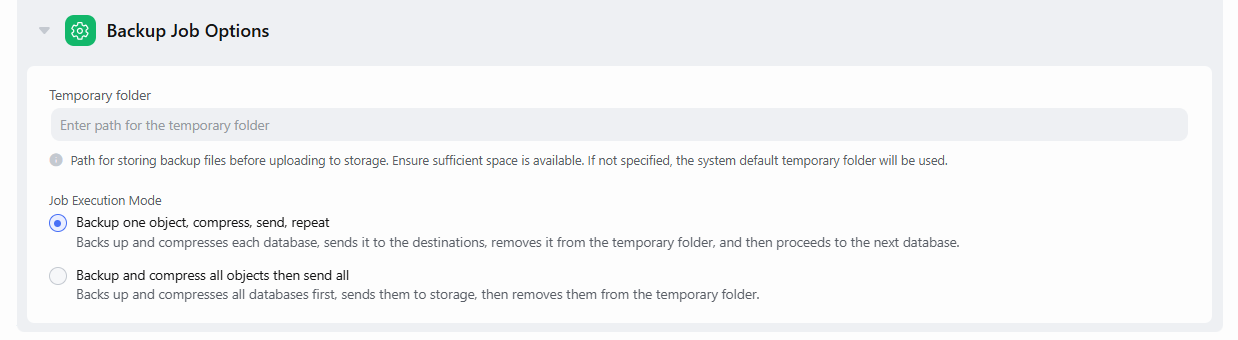
This section allows you to control where temporary backup files are stored and how the backup job processes multiple databases.
1. Temporary folder
Specify the path where backup files should be stored before being uploaded to their final destination.
If the folder is not specified, the system temporary directory will be used instead. On Windows, this is C:\Windows\Temp, and on Linux, it is /var/tmp.
However, using the default system directory is considered a bad security practice, since this folder is accessible to all users.
It is recommended to specify a custom directory located on a disk different from the one where the backup source resides.
This not only saves disk space but also helps distribute the load between two devices.
For the temporary folder to work properly, make sure the SqlBak Agent has read/write access to it. By default, the agent runs under the Local System Account.
2. Job Execution Mode
Choose how SqlBak will handle multiple databases within the same backup job:
- Backup one object, compress, send, repeat (default)
-
- SqlBak will back up and compress each database individually
- After the backup is finished, the file is uploaded to the storage destination
- Once the upload completes, the backup is removed from the temporary folder
- Then the next database is processed
Benefit: Minimizes required temporary disk space because each database is handled one by one.
- Backup and compress all objects then send all
-
- SqlBak will back up and compress all databases first
- Once all backups are completed, they will then be uploaded to the storage destination
- Temporary folder space must be sufficient to hold all database backups simultaneously
Benefit: The time difference between backups will be minimal.
If you need all backups to start simultaneously, create multiple backup jobs that run in parallel.